|

|
File unerase and data recovery software
|
|
|
|
|
|
Help - Select the Drive To Search
When you run Recover Files a main screen will be opened and at the left you can find drive selection panel.
This panel performs a scan to identify the devices (hard drives, digital camera, USB drive etc) that are connected to your computer. Select the device you wish to search by using your mouse to place a tick in the box next to the device name.
Drive Panel - Selecting the device to search
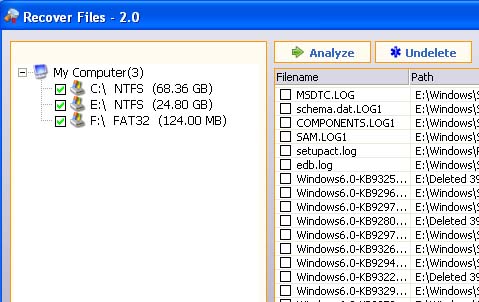
To remove drives from the search click on the tick to de-select it.
To proceed press the "Analyze" button. Scanning will only be available if at least one listed disk drive selected.
To refresh drives list after plugging up new devices such as Memory Stick or Digital Camera to your computer press the Drives button
Drives Button
|
|
|
|
|
| |


